Church members
Your church can join Propag8it and invite you in. Your souls, their names and your notes stay yours. Where the phone and the website differ, each task says so.
Join your church
Use the link your church sends, or type its 8-character code.
On the phone
- 1A join link opens on the website, in your phone's browser. In the app, use your church's code instead. It's 8 letters and numbers, like K7M4-PQ2X. You can only be in one church at a time.
- 2Tap the gear at the top right of Home, then tap Join or leave a church.
- 3Type the code in Join code and tap Continue.
- 4Read the join screen, then tap Join. Not sure yet? Tap Not now.
On the website
- 1Got a join link from your church? Open it while signed in and you land on the join screen. Signed out? Sign in first, then open the link again.
- 2No link? Your church can give you a code of 8 letters and numbers, like K7M4-PQ2X. You can only be in one church at a time.
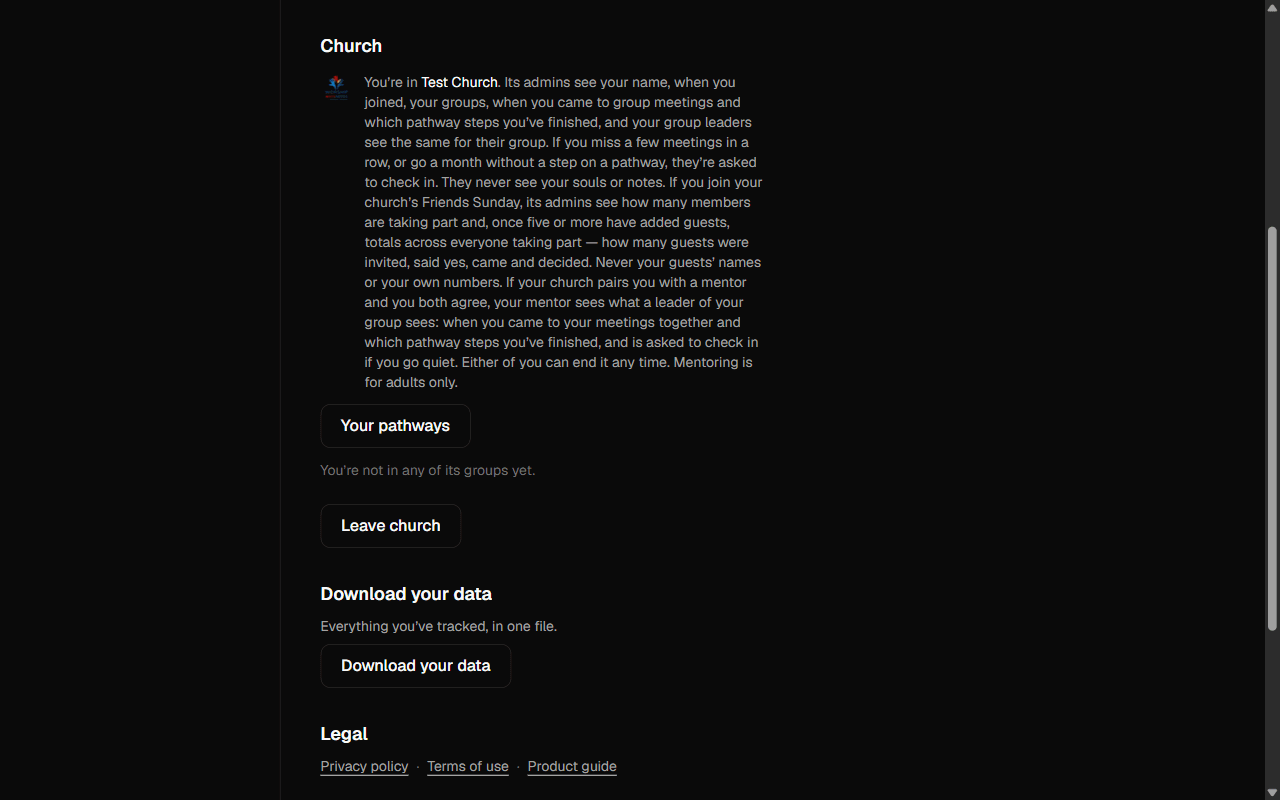
- 3Open Settings in the menu and find the Church section.
- 4Type the code in Join code and click Continue.
- 5Read the join screen, then click Join. Not sure yet? Click Not now.
Joining needs signal on the phone. Picking a church during first-time setup only tags you. It doesn't join you. See First-time setup.
What your church sees
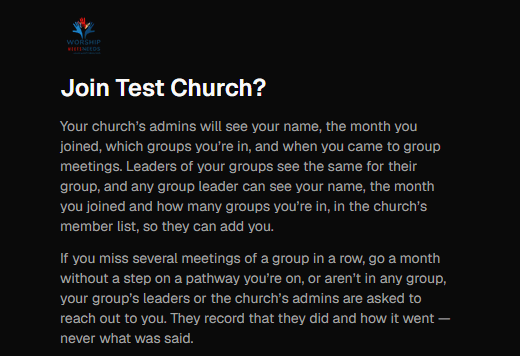
The join screen tells you before you join. Here it is, word for word.
- 1Names and groups: "Your church’s admins will see your name, the month you joined, which groups you’re in, and when you came to group meetings. Leaders of your groups see the same for their group, and any group leader can see your name, the month you joined and how many groups you’re in, in the church’s member list, so they can add you."
- 2Reaching out: "If you miss several meetings of a group in a row, go a month without a step on a pathway you’re on, or aren’t in any group, your group’s leaders or the church’s admins are asked to reach out to you. They record that they did and how it went — never what was said."
- 3Pathways: "If you start one of its pathways, or an admin puts you on one, its admins and your group leaders see which steps you’ve finished. You can leave a pathway any time."
- 4Friends Sunday: "If you join your church’s Friends Sunday, its admins see how many members are taking part and, once five or more have added guests, totals across everyone taking part — how many guests were invited, said yes, came and decided. Never your guests’ names or your own numbers."
- 5Mentoring: "If your church pairs you with a mentor and you both agree, your mentor sees what a leader of your group sees: when you came to your meetings together and which pathway steps you’ve finished, and is asked to check in if you go quiet. Either of you can end it any time. Mentoring is for adults only."
- 6Church totals: "Admins also see totals across the church: how many souls are at each step, how many were won, how active the church is. When you join, those totals move by your numbers, so someone who compares before and after can work out your own counts."
- 7The line in bold: They never see your souls, their names, or anything you’ve written.
- 8And last: "You can leave any time. Your numbers, your groups, your group attendance and your pathways leave with you."
Your notes are private to you, always. See Add notes and invite to join.
Your church's Friends Sunday
Join the date your church picked. Your guests and your numbers stay yours.
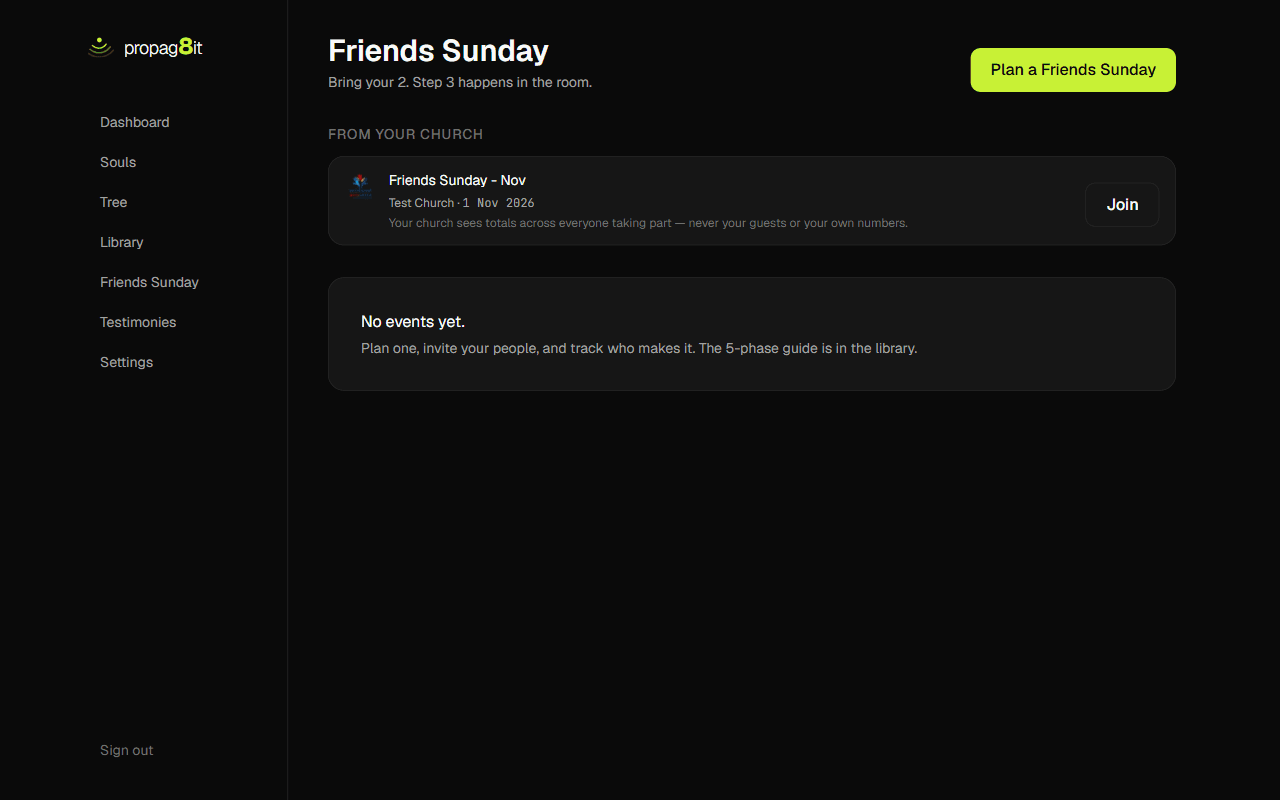
- 1Open Friends Sunday on the website, or the Sunday tab on the phone. A church Friends Sunday shows under From your church, with the church name, the date and the place. Only upcoming ones that aren't cancelled are listed.
- 2Tap or click Join. That makes your own copy of the event, with your own guest list.
- 3Once you've joined, the card shows Open. Add guests and track who comes the same way as your own Friends Sunday. See Your own Friends Sunday.
- 4Changed your mind? Open your copy and tap or click Leave. You confirm first. Your event and guests stay yours.
- 5If your church cancels, your event page says so. Your guests stay yours.
What your church sees: "Your church sees totals across everyone taking part — never your guests or your own numbers." On the phone, Friends Sunday needs signal.
Groups
See the groups you're in, and leave one. Your church creates them.
On the phone
- 1Go to Home, the gear, then Join or leave a church. Under Your groups you see each group, its kind, and whether you lead it.
- 2To leave one, tap Leave group and confirm.
On the website
- 1Open Settings. In the Church section, each group is listed with its kind: Fellowship, Department or Mentor pair.
- 2To leave one, click Leave group and confirm. If you lead it, you stop leading it.
Members can't create groups. Your church's leaders and admins do. On the phone, a mentor pair has no leave button. End it from the Mentoring screen.
Pathways
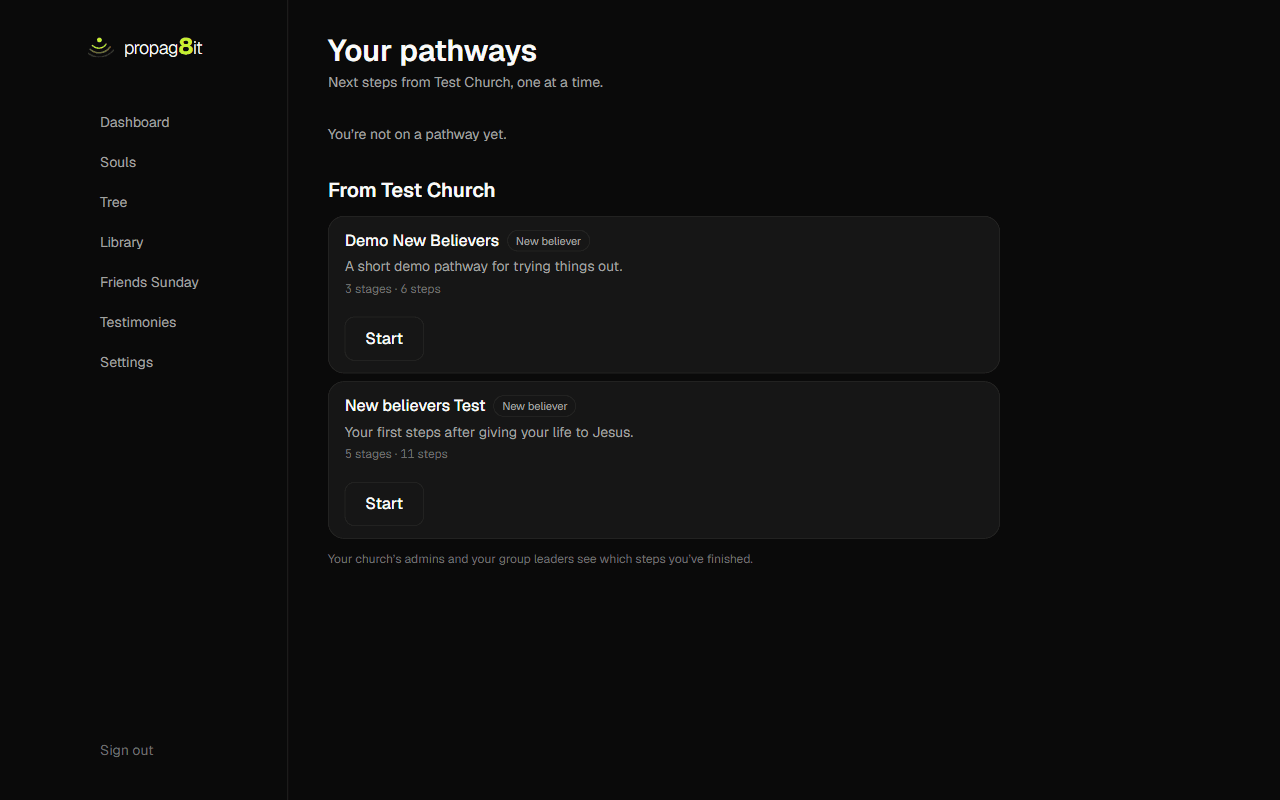
Next steps from your church, one at a time. Start one, tick steps, leave any time.
On the phone
- 1Your church has published a pathway? A violet card on Home says so. Tap See pathways.
- 2Tap Start on the pathway you want.
- 3Open a step. For a lesson, tap Read the lesson, then Mark as read. For an action, tap Done. Ticked too soon? Tap Undo.
- 4Once you're on one, the Home card shows the pathway and your next step. Tap it to carry on.
- 5To leave, open the pathway and tap Leave this pathway. You confirm first.
On the website
- 1Pathways aren't in the menu. Open Settings, find the Church section and click Your pathways.
- 2Click Start on the pathway you want.
- 3Open a step. For a lesson, click Read the lesson, then Mark as read. For an action, click Done. Ticked too soon? Click Undo.
- 4To leave, open the pathway and click Leave this pathway. You confirm first.
Some steps are milestones, like a baptism. You can't tick those. A leader confirms them, and you see the step marked Confirmed. Leaving deletes the steps you ticked on that pathway. An admin can also put you on a pathway. "Your church’s admins and your group leaders see which steps you’ve finished."
Mentoring invitations
Your church can pair you with a mentor. Nothing is shared until you both accept.
On the phone
- 1An invitation shows as a card on Home. Tap See invitation. You can also reach it from the gear, Join or leave a church, then Mentoring.
- 2Read what a mentor sees. Then tick I’m 18 or over. Mentoring is for adults only.
- 3Accept stays greyed out until the box is ticked. Or choose Decline.
- 4After you accept, you wait for the other person. Cancel takes your answer back, and you confirm first.
- 5Once you've both accepted, the pairing is active. End stops it, at any time, from either side. Ending deletes your meetings together and any check-ins about missed meetings.
On the website
- 1Open Settings. The invitation shows in the Church section, above your groups.
- 2Read what a mentor sees. Then tick I’m 18 or over. Mentoring is for adults only.
- 3Accept stays greyed out until the box is ticked. Or choose Decline.
- 4After you accept, you wait for the other person. Cancel takes your answer back, and you confirm first.
- 5Once you've both accepted, the pairing is active. End stops it, at any time, from either side. Ending deletes your meetings together and any check-ins about missed meetings.
A mentor records when you meet on the website. The phone tells a mentor to open the pair there. What a mentor sees: "They never see your souls, prayers or notes."
Church alerts
Phone only. A nudge when your church needs you.
On the phone
- 1Tap the gear on Home and turn on Church alerts. It's off until you do.
- 2You get an alert when your church invites you to mentoring or a Friends Sunday. If you lead a group or are an admin, you also get one when someone needs you.
- 3An alert names the church. It never names a person.
The website has no alerts. Turning them on needs signal and permission in your phone's settings.
Leave your church
Leave any time. Your numbers, groups, group attendance and pathways leave with you.
On the phone
- 1Tap the gear on Home, then Join or leave a church. Tap Leave.
- 2Read the question and confirm.
On the website
- 1Open Settings. In the Church section, click Leave church.
- 2Read the question and confirm.
What leaves with you: "Your numbers, your groups, your group attendance and your pathways leave with you." Any mentoring ends too. Your souls and notes were never your church's, so they stay yours. Leaving needs signal.